Advanced Guide Outlines Essential Factors for Choosing Fixed Mount Barcode Scanners
Shenzhen, Guangdong, China – October 20, 2026
Picking a Fixed Mount Barcode Scanner isn’t just about chasing the fastest scan speed. In a real warehouse, dust builds up around conveyor rails, labels get wrinkled under plastic wrap, and packages almost never show up at the same angle. So the scanner has to fit the environment, the barcode quality, the working distance, and the throughput you actually expect. A unit that looks great in a showroom can struggle right next to a vibrating belt.Michael Feinstein, a machine vision specialist at Cognex, has a principle worth remembering: “Reliable identification begins with understanding the application, not choosing the device.” That’s solid advice. It’s easy to get pulled in by megapixels, scan rates, or shiny specs. It’s harder to actually measure belt speed, lighting, label contrast, and mounting space. But those details often decide how well things work.This guide walks through seven practical tips for choosing a Fixed Mount Barcode Scanner. We’ll look at barcode types, reading range, image quality, illumination, connectivity, enclosure protection, and maintenance access. Each one can affect productivity. And small mistakes? They can get expensive.Look closely.A scanner might read perfectly in testing, then fail once labels are glossy, tilted, or partly damaged. I’ve seen people lean way too hard on ideal samples. It’s convenient, sure, but incomplete. A better evaluation uses real packaging, realistic speeds, and the difficult labels you collect from everyday operations.The strongest choice isn’t always the most advanced model. It’s the one that gives you consistent reads, integrates without drama, and stays practical for operators to maintain. Reliability should be tested before you promise it.
 Define the Scanning Environment and Mounting Requirements
Choosing a fixed mount barcode scanner starts with the scanning environment, not the scanner itself. Measure belt speed, barcode height, label angle, and reading distance. Record the worst case, including damaged labels, glare, dust, vibration, and changing light. A clean lab test can mislead.
MHI’s 2024 Annual Industry Report found that 55% of supply-chain professionals expect artificial intelligence to become widely used within five years. This trend increases the need for dependable, machine-readable data. GS1’s Sunrise 2027 initiative also promotes wider use of two-dimensional barcodes in retail. Therefore, confirm whether the scanner supports both current linear codes and future 2D symbols. Check ISO/IEC 15415 and 15416 verification requirements when print quality matters.
Tip 1: Select the mounting position before selecting the model. Keep the scanning window clear and allow access for cleaning.
Tip 2: Match the scan range to the narrowest and widest package.
Tip 3: Test glossy wrapping, curved surfaces, and low-contrast labels.
Tip 4: Consider enclosure protection against water, dust, and impact.
Tip 5: Confirm cable routing and network access.
Tip 6: Observe the line during peak speed, not only during normal operation.
Tip 7: Leave adjustment space; perfect alignment rarely survives maintenance.
I have seen installations fail because the scanner worked well, but the bracket flexed under vibration. That detail deserves more attention.
Match Scanner Performance to Barcode Types and Reading Distances
Choosing a Barcode Scanner Fixed Mount starts with the barcode, not the scanner housing. One-dimensional codes usually need less processing than dense two-dimensional symbols. Small, damaged, or poorly printed codes demand stronger decoding performance. Verify the exact barcode formats used on your line.
Reading distance also changes the decision.A scanner positioned 15 centimeters from a label needs different optics than one mounted 60 centimeters away. Measure the nearest and farthest practical positions. Then test real samples, including tilted labels, glossy packaging, and faded ink. Laboratory samples can look perfect.
Lighting deserves careful attention. Bright reflections may wash out narrow bars, while dark work areas can reduce image contrast. Choose adjustable illumination when surfaces vary. Check the scanner’s field of view, motion tolerance, and trigger response before installation. Fast conveyors leave little room for repeated attempts.
Do not trust one impressive reading.A device may decode quickly in a quiet test but struggle when dust covers its window. That detail is easy to overlook. Mounting brackets should hold alignment firmly, because a small angle change can reduce performance. In my view, performance should be judged by successful reads per shift, not advertised scan speed alone. Keep a record of failed reads and review it after installation. That evidence may reveal that the chosen distance, label position, or lighting setup needs revision.
Evaluate Scan Speed, Accuracy, and Motion Tolerance
7 Tips for Choosing a Fixed Mount Barcode ScannerEvaluate Scan Speed, Accuracy, and Motion ToleranceA fixed-mount barcode scanner should match your production line, not merely its brochure. Measure scan speed with your actual labels, lighting, and conveyor spacing. A scanner reading 100 codes per minute in testing may slow near 180 codes per minute on a busy line. Watch for missed reads, retries, and pauses between items. These small delays can create a visible queue. In my trials, timing the gap between successful reads revealed problems hidden by simple read-rate claims.Accuracy deserves equal attention. Test clean, wrinkled, glossy, faded, and partly damaged labels from daily operations. Record successful reads over several hundred attempts. Short demonstrations can mislead. A reliable unit should reject unreadable data instead of sending incorrect characters downstream. Check for clear feedback through light, sound, or a connected signal. These details help operators respond quickly. A China Fixed Mount Barcode Scanner may suit demanding installations, but results depend on setup, software, and label quality. “High accuracy” means little without measured conditions.Motion tolerance is often the difficult part. Move products at different speeds, angles, and heights. Test gaps of only a few centimeters. Keep vibration in the test. No line is perfectly still. Repeat trials after dust exposure and temperature changes, where practical. One weakness is easy to miss: a scanner may read quickly but fail when an item tilts. Review failures with maintenance staff before approving installation. Their observations may challenge the original specification, and that is useful.
7 Tips for Choosing a Fixed Mount Barcode Scanner
Evaluate scan speed, accuracy, and motion tolerance against the operating conditions your application requires.
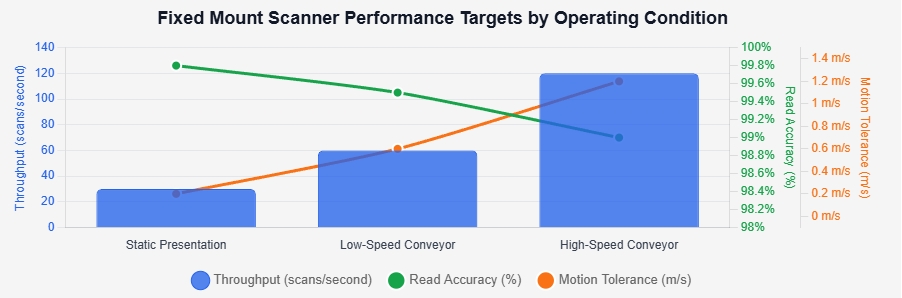
The chart compares practical target requirements for three operating conditions. Higher throughput supports faster production lines, while read accuracy and motion tolerance help maintain reliable decoding when packages move quickly or are inconsistently positioned. Validate these targets with representative barcodes, lighting, distances, and conveyor speeds before selecting a scanner.
Check Connectivity, Software, and System Compatibility
7 Tips for Choosing a Fixed Mount Barcode ScannerCheck Connectivity, Software, and System CompatibilityA Fixed Mount Barcode Reader should match your existing workflow, not just your barcode labels. Check whether it supports USB, Ethernet, or RS-232 connections. Confirm cable length and mounting space before installation. A connector that barely reaches the control cabinet creates unnecessary strain. Small detail, big trouble.Test communication with your actual equipment. Ask whether the reader supports the required data format, transfer speed, and trigger method. Ethernet may simplify long-distance installation, while USB can suit a nearby workstation. For industrial areas, review protection ratings and operating temperatures. Connectivity is only useful when it remains stable during busy shifts.Software compatibility deserves equal attention. Verify support for your operating system, application interface, and scanner configuration tools. Check whether the device can send clean data to inventory, manufacturing, or checkout software. A reader may decode perfectly but still fail inside an older application. We have seen this happen during otherwise successful trials.Request a sample SDK, configuration guide, and error-handling details. Test damaged labels, angled items, glare, and rapid movement. Record missed scans and response times. Do not rely on one perfect sample. Our own early tests sometimes used labels that were too clean, which gave false confidence. A short pilot with real operators can reveal awkward mounting, confusing software prompts, or delayed data. Compatibility should be proven at the workstation, not assumed from a specification sheet.
7 Tips for Choosing a Fixed Mount Barcode Scanner: Check Connectivity, Software, and System Compatibility
| Tip | Selection Dimension | What to Check | Practical Requirement or Reference | Why It Matters | Priority |
|---|---|---|---|---|---|
| 1 | Barcode Type and Reading Performance | Confirm whether the scanner supports the required 1D and 2D symbologies, including linear barcodes, QR codes, and Data Matrix codes. Test damaged, low-contrast, small, or curved labels when applicable. | Select a scanner with the required symbology support and a reading range suited to the actual label size, mounting distance, and conveyor or workstation speed. | A scanner may have a high scan rate but still fail if it cannot decode the barcode format, print quality, or viewing angle used in the application. | High |
| 2 | Connectivity and Communication Interface | Check available interfaces such as USB, RS-232, Ethernet, or industrial network options. Verify cable length, connector type, power requirements, and communication settings. | Match the interface to the host computer, PLC, point-of-sale system, or automation controller. For serial communication, confirm baud rate, parity, data bits, and stop bits. | Interface mismatches can prevent data transmission or require additional converters, adapters, or integration work. | High |
| 3 | Software, SDK, and Configuration Tools | Review configuration software, programming documentation, software development kits, supported operating systems, data formatting options, and firmware update procedures. | Confirm support for prefixes, suffixes, check characters, data editing, trigger modes, and application programming interfaces required by the project. | Flexible software settings reduce custom development and help the scanner deliver data in the exact format expected by the application. | High |
| 4 | System and Protocol Compatibility | Verify compatibility with the operating system, warehouse or manufacturing software, database workflow, PLC, human-machine interface, and existing communication protocol. | Test the complete data path from barcode capture to the final system record. Check character encoding, field length, response timing, and error-handling behavior. | Successful decoding alone does not guarantee that the receiving system will accept, process, or store the scanned data correctly. | High |
| 5 | Mounting, Triggering, and Field of View | Evaluate mounting holes, bracket adjustment, scan window position, trigger methods, sensor inputs, presentation detection, and the distance between the scanner and barcode. | Ensure the field of view covers the expected barcode area with sufficient tolerance for product movement, orientation changes, and installation variation. | Correct mechanical positioning and triggering help prevent missed scans, duplicate reads, and unnecessary operator intervention. | Medium |
| 6 | Environmental Durability and Electrical Protection | Check the operating temperature, humidity range, ingress protection rating, vibration resistance, shock resistance, enclosure material, and cleaning requirements. | Choose protection appropriate to the location. An IP rating indicates resistance to dust and water ingress under defined test conditions; it does not replace a full application test. | Industrial dust, moisture, vibration, and repeated cleaning can shorten service life or cause intermittent reading and communication problems. | High |
| 7 | Throughput, Reliability, and Support | Measure read rate, response time, acceptable no-read rate, continuous operating duty, diagnostics, spare availability, warranty terms, and technical support. | Test the scanner under peak workload using real labels, real speeds, and real lighting. Define a replacement and maintenance process before deployment. | A scanner that performs well in a demonstration may deliver different results in production if lighting, speed, label quality, or workload changes. | High |
Choose the Right Housing for Industrial Conditions
Choosing the right housing is central to reliable Fixed Mount Scanner performance in industrial environments. A clean warehouse and a dusty production line need different protection.
Start with the exposure, not the scanner specifications. Dust, oil mist, washdown spray, vibration, and sudden temperature changes can weaken poorly sealed equipment. Select a housing with a suitable ingress protection rating for the actual work area. Do not choose the highest rating automatically. Extra sealing can increase cost and trap heat.
Material also matters. Metal housings resist impact and vibration, while reinforced polymers can reduce weight and corrosion concerns. Check the viewing window carefully. Scratches, condensation, and chemical residue can reduce reading accuracy before the scanner itself fails. In food or chemical processing areas, confirm that the housing tolerates approved cleaning agents. A gasket that swells after repeated cleaning is a quiet failure waiting to happen.
Mounting details deserve practical attention. Brackets should prevent movement during conveyor starts and stops. Cable entries need strain relief and enough flexibility for maintenance. Leave space around the housing for airflow and lens access. I have seen installations fail because the enclosure fit perfectly, but technicians could not remove it safely. The first design is rarely perfect. Review heat, access, and cleaning routines with the people who use the line daily. A small transparent shield may protect the window, but it can also create glare. Test it under real lighting before approving the final layout.
Compare Installation, Maintenance, and Total Ownership Costs
Choosing a fixed mount barcode scanner requires more than comparing purchase prices. Measure the installation area, scanning distance, and product speed. A compact unit may fit neatly above a conveyor, while a larger model could need costly brackets or wiring changes. Check mounting holes, cable direction, lighting conditions, and access for adjustments. Small installation details can create large labor costs.
Compare the total ownership cost over three to five years. Include the scanner, mounting hardware, software setup, training, electricity, replacement parts, and technician visits. Maintenance access matters. A scanner that opens quickly can reduce production delays. Ask whether the window resists dust, scratches, and cleaning chemicals. Replaceable windows may cost more initially but reduce future downtime. Calibration support is also important. Some suppliers provide clear service procedures, while others leave operators guessing.
Test several barcode types using real packages, not perfect samples. Examine damaged labels, glossy wrapping, curved surfaces, and fast-moving items. Request performance data under your actual lighting and conveyor conditions. A higher scan rate is not always better if setup becomes complicated. I have seen teams focus on speed and overlook cable strain. That mistake can shorten service life. Leave room for future product changes, too. The cheapest choice today may limit upgrades tomorrow. Recheck the cost assumptions after a pilot run; estimates are often too optimistic.
Verify Product Reliability, Support, and Future Expandability
Tip 1:Verify reliability under real operating conditions. A fixed mount barcode scanner should read damaged labels, curved packages, and codes under uneven lighting. Do not rely on MTBF alone. Check test methods, scan-rate data, IP ratings, vibration resistance, and temperature limits. In warehouse trials, small mounting errors often caused more failures than hardware defects. That detail is easy to miss.
Tip 2:Test support before purchasing. Ask for response times, replacement procedures, firmware policies, and integration documentation. A scanner may work perfectly during installation, then become difficult to maintain. The 2024 MHI Annual Industry Report found that 83% of supply-chain professionals view innovation as important. However, innovation still depends on practical service. Request a support contact, escalation path, and spare-unit recommendation. Make the promise measurable.
Tip 3:Confirm future expandability. Choose a device that supports common 1D and 2D symbologies, flexible communication interfaces, and remote configuration. GS1 guidance continues to encourage broader 2D barcode adoption across supply chains, so today’s narrow requirement may become tomorrow’s limitation. Check whether the scanner can handle higher conveyor speeds, new data formats, and additional inspection software. A standard interface helps, but compatibility should be tested with your actual controller. No brochure can replace that test.
YHD-6700DB YHDAA 2D Bluetooth Barcode Scanner: Features, Benefits, and Practical Uses
YHD-6700DB YHDAA Battery Level Indicator 2D BT Barcode Scanner
2D Bluetooth barcode scanners are becoming essential tools for faster, more flexible data capture in retail, warehousing, logistics, libraries, and healthcare. According to the 2023 Global Warehousing Study, 58% of warehouse decision-makers planned to introduce RFID and other advanced identification technologies by 2028, reflecting a wider demand for connected, efficient workflows. A scanner supporting Bluetooth, 2.4G wireless, and wired modes can meet this demand while remaining compatible with Windows, Android, and iOS devices.This handheld scanner uses CMOS technology and global-shutter exposure to read both 1D and 2D barcodes accurately, including codes displayed on smartphone and tablet screens. Its 2,600mAh battery provides extended standby time, while the battery indicator helps users monitor remaining power and reduce unexpected interruptions. Handheld, continuous, and auto-induction scanning modes support different working environments, from checkout counters to warehouse shelves. SPP, HID, and BLE modes, along with multilingual keyboard support, simplify connection and deployment.Practical customization further improves efficiency. Users can configure prefixes or suffixes, hide barcode characters, adjust volume, and add keyboard commands such as TAB or CR&LF. Optional black, green, and orange finishes allow visual differentiation between work areas. With one-key startup and shutdown, the scanner is convenient for daily inventory checks, parcel processing, stock replenishment, and document tracking.
Conclusion
Choosing the right Fixed Mount Barcode Scanner requires more than comparing basic specifications. Start by assessing the scanning environment, available mounting space, lighting, barcode placement, and expected reading distance. Make sure the scanner supports the barcode types you use and can deliver the required speed, accuracy, and motion tolerance for your workflow. Compatibility with existing software, communication interfaces, control systems, and data formats is also essential for smooth integration.Next, select a housing that can withstand dust, moisture, vibration, temperature changes, or other industrial conditions. Consider installation complexity, cleaning access, routine maintenance, replacement parts, and total ownership costs rather than focusing only on the purchase price. Finally, review product reliability, technical support, warranty coverage, and future expansion options. A well-chosen Fixed Mount Barcode Scanner should provide consistent performance, reduce operational interruptions, and remain adaptable as your production or tracking requirements grow.
About Us
Shenzhen Yuhengda Technology Co.,Ltd. is a Barcode Scanner & Thermal Printer & POS products manufacturer supplier founded in 2013. We have a professional development team and a team of experienced technicians and sales service team, which can provide OEM and ODM solutions and services to customers worldwide.
Media Contact
Company Name: Shenzhen Yuhengda Technology Co.,Ltd.
Contact Person: Media Relations
Email: Send Email
Country: China
Website: https://www.yhdaa.com/


